
Logic
Logic blocks are generally used to control if statements and loop blocks.
If statement
The if block lets you set a condition and the action to take when that condition is met.
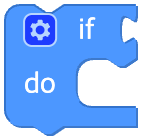
For example, you can write code like the following.
If the value of the variable x is greater than 100, the condition is true and the text "It is a big number." is printed.
If the value of x is not greater than 100, the condition is false and "It is not a big number." is printed.
Python
if condition:
  # ...
elif condition2:
  # ...
else:
  # ...
Comparisons
There are six comparison operators.
Each operator takes two inputs (usually numbers) and returns true or false depending on how the inputs compare with each other.

Python
A == B
A != B
A < B
A <= B
A > B
A >= B
Logical operations
The and block returns true only when both inputs are true.
The or block returns true if either of the two inputs is true.

Python
A and B
A or B
Not
The not block converts a Boolean input into its opposite.

Python
not ABoolean
You can obtain a Boolean value using a single block with a dropdown that selects true or false.

Python
True
False
Ternary operator
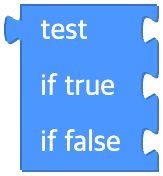
The ternary block works like a simple if block.
It takes three inputs.
The first input is the Boolean condition to test, and the second is the value to return when the condition is true.
The third is the value to return when the condition is false.
Python
thenValue if test else elseValue