
Text
Here are some examples of text:
- "thing #1"
- "March 12, 2010"
- "" (an empty string)
Text can contain uppercase or lowercase letters, numbers, punctuation, other symbols, and spaces between words.

Create text with
The create text with block joins (concatenates) the values of several strings to build a new string.

Python
'' + str(A) + str(B) + str(C)Append text
The append text block adds the given text to the specified variable.

Python
VAR = str(VAR) + TEXTLength of text
The length of block counts the letters, numbers, and other characters in a string and returns the total length.
The length of abc below is 3, and the length of an empty string is 0.

Python
len(VALUE)Is empty
The is empty block checks whether the given string is empty (that is, whether its length is 0).

Python
len(VALUE) == 0Find text
These blocks check whether one string occurs inside another and, if it does, return its position.

Python
(VALUE.find(FIND) + 1)
(VALUE.rfind(FIND) + 1)
Get a single letter
Gets one character at a specific position in a string.
There are several options: first, last, random, and letter #N.

Python
TEXT[N - 1]
TEXT[len(TEXT) - N]
TEXT[0]
TEXT[-1]
TEXT[int(random.random() * len(TEXT))]
Get substring
The get substring block lets you extract a specific range of a string.

Python
TEXT[at1:at2]Change letter case
This block converts the input string into one of the following forms:
- UPPER CASE: converts every letter to uppercase
- lower case: converts every letter to lowercase
- Title Case: capitalizes the first letter of each word and lowercases the rest

Python
TEXT.upper() # UPPER CASE
TEXT.lower() # lower case
TEXT.title() # Title Case
Trim whitespace
The following block removes whitespace from a string at these positions:
- both sides
- left side
- right side

Python
TEXT.strip()    # both sides
TEXT.lstrip()   # left side
TEXT.rstrip()   # right side
Count occurrences in text
Counts and returns how many times a specific substring appears in the given string.

Python
HAYSTACK.count(NEEDLE)Replace text
Replaces every occurrence of a specific substring in a string with another string.

Python
HAYSTACK.replace(NEEDLE, REPLACEMENT)Reverse text
Returns a new string with the order of the characters reversed.

Python
TEXT[::-1]Print text
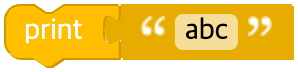
The print block shows the input value in a popup window.
Python
print(TEXT)Get user input
The following block creates a popup window that asks the user for input, and the entered value is stored in a variable.
You can accept either text or a number.

Python
input(TEXT)
float(input(TEXT))