
Variables
We use the term variable in the same sense as in mathematics and other programming languages.
That is, it means a named element that stores a value and can be changed.
Variables can be created in several ways.
- Some blocks, such as count with and for each item, use a variable and define its value.
Such variables are traditionally called loop variables. - Custom functions also use variables to define parameters or arguments.
- You can create a variable at any time with the set block, and any variable created this way is declared as a global variable.
- The block coding environment in RobomationLAB does not support local variables.
Clicking the dropdown on a variable block shows the following options.
- The names of all existing variables defined in the program are listed.
- "Rename Variable": renames that variable throughout the program. Choosing this option opens a window where you can enter the new name.
- "Delete Variable": deletes every block in the program that refers to this variable.
Set
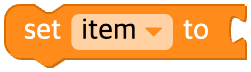
The set block assigns a value to a variable.
If the variable has not been declared in the code, it declares the new variable and then assigns the value.
Python
python
item = VALChange
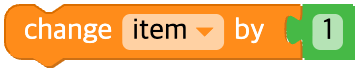
The change block adds a number to the value of a variable.
Python
python
item = item + 1Get
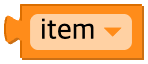
The block below provides the value stored in a variable, but does not change that value.
It is possible to use this block without a set block, but that is not good programming practice.
Python
python
item