
HAT-010 5x5 点阵
声明实例
把 HAT-010 5x5 点阵(HAT010) 积木添加到工作区后,Python 代码中会自动插入下面这样的实例声明:
python
cheesestick = CheeseStick(0)
hat010 = cheesestick.HAT010()
参数
| 名称 | 类别 | 说明 | 范围 / 种类 | 默认值 |
|---|---|---|---|---|
| index | 下拉选项 | 实例编号(从 0 开始) | 0 以上的整数 | 0 |
启动
开始使用 5x5 点阵。

参数
(无)
Python
python
cheesestick = CheeseStick(0)
hat010 = cheesestick.HAT010()

hat010.start()
点亮一个 LED
设置指定位置的 LED 颜色。
LED 的位置用 x, y 坐标表示。

参数
| 名称 | 类别 | 说明 | 范围 / 种类 | 默认值 |
|---|---|---|---|---|
| x | 输入值(字段) | 横坐标 | 0 ~ 4 的整数 | - |
| y | 输入值(字段) | 纵坐标 | 0 ~ 4 的整数 | - |
| color | 下拉选项 | 颜色 | 关闭(off), 红色(red), 橙色(orange), 黄色(yellow), 绿色(green), 青色(cyan), 蓝色(blue), 紫色(violet), 洋红色(magenta), 白色(white) | - |
Python
python
cheesestick = CheeseStick(0)
hat010 = cheesestick.HAT010()

hat010.set_one(2, 3, 'red')
绘制图形
从指定的位置开始,按设定的图案点亮 LED。
LED 的位置用 x, y 坐标表示。

参数
| 名称 | 类别 | 说明 | 范围 / 种类 | 默认值 |
|---|---|---|---|---|
| x | 输入值(字段) | 图形左上角的 x | 整数 | - |
| y | 输入值(字段) | 图形左上角的 y | 整数 | - |
| color | 下拉选项 | 颜色 | off, red, orange, yellow, green, cyan, blue, violet, magenta, white | - |
| shape | 下拉选项 | 图形名称 | rectangle, triangle, diamond, circle, x, like, dislike, angry, mouth_open, mouth_close, heart, star, up_arrow, down_arrow, left_arrow, right_arrow, walking, dog, butterfly, airplane, quarter_note, eighth_note | - |
Python
python
cheesestick = CheeseStick(0)
hat010 = cheesestick.HAT010()

hat010.draw_shape(0, 0, 'red', 'heart')
绘制数字
从指定的位置开始,按设定的图案点亮 LED。
LED 的位置用 x, y 坐标表示。

参数
| 名称 | 类别 | 说明 | 范围 / 种类 | 默认值 |
|---|---|---|---|---|
| x | 输入值(字段) | 数字左上角的 x | 整数 | - |
| y | 输入值(字段) | 数字左上角的 y | 整数 | - |
| color | 下拉选项 | 颜色 | off, red, orange, yellow, green, cyan, blue, violet, magenta, white | - |
| number | 下拉选项 | 要绘制的数字 | 0, 1, 2, 3, 4, 5, 6, 7, 8, 9 | - |
Python
python
cheesestick = CheeseStick(0)
hat010 = cheesestick.HAT010()

hat010.draw_number(0, 0, 'red', 5)
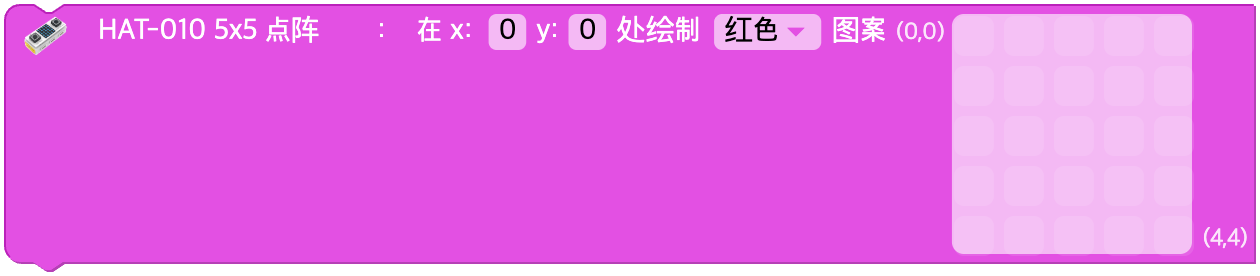
绘制图案
从指定的位置开始,按设定的图案点亮 LED。
LED 的位置用 x, y 坐标表示。
参数
| 名称 | 类别 | 说明 | 范围 / 种类 | 默认值 |
|---|---|---|---|---|
| x | 输入值(字段) | 左上角的 x | 整数 | - |
| y | 输入值(字段) | 左上角的 y | 整数 | - |
| color | 下拉选项 | 颜色 | off, red, orange, yellow, green, cyan, blue, violet, magenta, white | - |
| matrix | 输入值(数组) | 25 格的像素数组 (0/1) | 长度为 25 的整数数组 | - |
Python
python
cheesestick = CheeseStick(0)
hat010 = cheesestick.HAT010()

hat010.draw_pattern(0, 0, 'red', [
   1, 0, 1, 0, 1,
   0, 1, 0, 1, 0,
   1, 0, 1, 0, 1,
   0, 1, 0, 1, 0,
   1, 0, 1, 0, 1
])
移动
按指定的 x, y 移动画面。
x 为正数时画面向右移动,为负数时向左移动。
y 为正数时画面向下移动,为负数时向上移动。

参数
| 名称 | 类别 | 说明 | 范围 / 种类 | 默认值 |
|---|---|---|---|---|
| x | 输入值(字段) | 横向移动量 | 整数 | - |
| y | 输入值(字段) | 纵向移动量 | 整数 | - |
Python
python
cheesestick = CheeseStick(0)
hat010 = cheesestick.HAT010()

hat010.shift(1, 0)
关闭一个 LED
关闭指定位置的 LED。
LED 的位置用 x, y 坐标表示。

参数
| 名称 | 类别 | 说明 | 范围 / 种类 | 默认值 |
|---|---|---|---|---|
| x | 输入值(字段) | 横坐标 | 0 ~ 4 的整数 | - |
| y | 输入值(字段) | 纵坐标 | 0 ~ 4 的整数 | - |
Python
python
cheesestick = CheeseStick(0)
hat010 = cheesestick.HAT010()

hat010.turn_off_one(2, 3)
关闭所有 LED
关闭画面上显示的所有 LED。

参数
(无)
Python
python
cheesestick = CheeseStick(0)
hat010 = cheesestick.HAT010()

hat010.turn_off_all()
设置亮度
设置 5x5 点阵的亮度。
可以选择的值的范围是 0 ~ 100。

参数
| 名称 | 类别 | 说明 | 范围 / 种类 | 默认值 |
|---|---|---|---|---|
| value | 输入值(字段) | 亮度 | 0 ~ 100 的整数 | - |
Python
python
cheesestick = CheeseStick(0)
hat010 = cheesestick.HAT010()

hat010.set_brightness(50)
改变亮度
改变 5x5 点阵的亮度。
可以选择的值的范围是 -100 ~ 100。

参数
| 名称 | 类别 | 说明 | 范围 / 种类 | 默认值 |
|---|---|---|---|---|
| value | 输入值(字段) | 亮度变化量 | 整数 | - |
Python
python
cheesestick = CheeseStick(0)
hat010 = cheesestick.HAT010()

hat010.change_brightness(10)
按钮
所选按钮的输入状态
按钮被按下时输出 0,没有被按下时输出 1。

参数
| 名称 | 类别 | 说明 | 范围 / 种类 | 默认值 |
|---|---|---|---|---|
| unit | 下拉选项 | 按钮名称 | A 按钮(A), B 按钮(B) | - |
Python
python
cheesestick = CheeseStick(0)
hat010 = cheesestick.HAT010()

hat010.button_input('A')
按钮被点击?
所选按钮是否被点击
这个积木只在所选按钮被点击的那一刻返回 true,其他时候返回 false。

参数
| 名称 | 类别 | 说明 | 范围 / 种类 | 默认值 |
|---|---|---|---|---|
| unit | 下拉选项 | 按钮名称 | A 按钮(A), B 按钮(B) | - |
Python
python
cheesestick = CheeseStick(0)
hat010 = cheesestick.HAT010()

hat010.button_click('A')